

Kompletní ukázka: poloha ISS (driver + protokol)
Předchozí kapitoly ukázaly kostry — zde je nejmenší skutečně funkční dvojice driver + protokol, jakou lze napsat. Přestože se celá vejde na několik obrazovek, pracuje s reálnými živými daty: jednou za sekundu se dotáže veřejného REST API na aktuální polohu Mezinárodní vesmírné stanice a plní čtyři proměnné — zeměpisnou šířku, délku, výšku a rychlost objektu, který právě obíhá Zemi rychlostí přibližně 27 600 km/h.
Dělba práce je přesně ta, kterou používají všechny drivery a protokoly v QInsight:
- IssDriver má jediný úkol: v zadané periodě stáhne přes
HttpClientjednu JSON odpověď a předá ji protokolům tak, jak přišla. O jejím obsahu nic neví — z jeho pohledu jde pouze o text. - IssJsonProtocol dostane text, rozparsuje ho jako JSON a rozdělí hodnoty
proměnným. Každá proměnná určuje commParamem
path="latitude"své pole, takže jedna odpověď naplní všechny proměnné najednou.

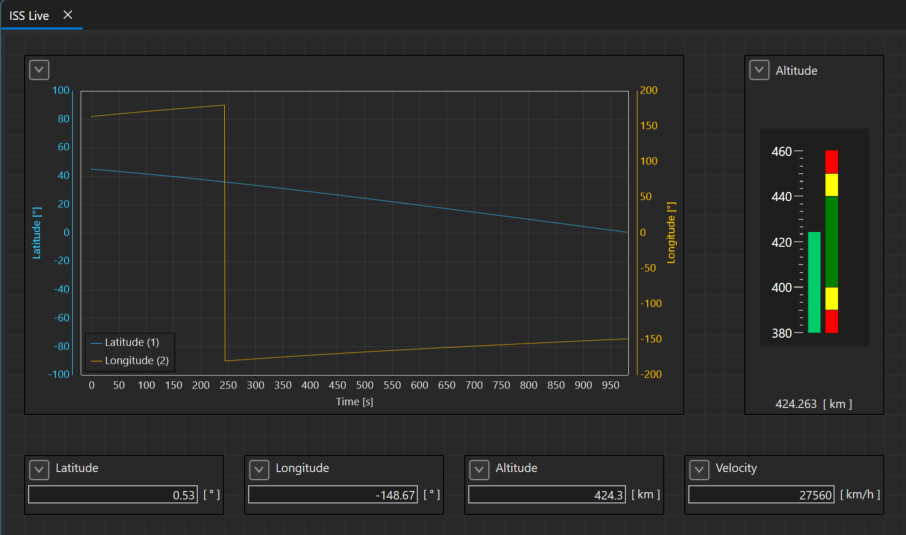
Data mají navíc užitečnou vlastnost: nejsou náhodná. Zeměpisná šířka kreslí sinusoidu s periodou jednoho oběhu (~92 minut). Zeměpisná délka zase pilový průběh: plynule roste, při 180° přejde na −180° a roste znovu — stanice letí stále „rovně“, ale Země se pod ní otáčí, takže každý oběh začíná o něco západněji. Necháte-li graf běžet několik minut, tyto tvary se stanou zřetelnými.
Odkud data pocházejí
Ukázka používá API wheretheiss.at — je zdarma, bez registrace a klíče. Jeden GET požadavek:
https://api.wheretheiss.at/v1/satellites/25544
vrátí jeden plochý JSON objekt (25544 je katalogové číslo ISS):
{
  "name": "iss",
  "latitude": -29.06,
  "longitude": 20.04,
  "altitude": 423.31,
  "velocity": 27575.13,
  "visibility": "daylight",
  ...
}
Provozovatel žádá o nejvýše ~1 požadavek za sekundu — driver proto
rychlejší periodu odmítne (viz SetConfiguration níže). K běhu ukázky je
potřeba připojení k internetu.
Jak si ukázku vyzkoušet
Hotový projekt s touto dvojicí pluginů je v instalátoru jako
Qenex_IssLiveTracking.qproj, popsaný v příkladu
Poloha ISS naživo. Postup níže jej sestavuje od začátku.
- Oba pluginy už dodává instalátor
(
Qenex.QSuite.Examples.IssDriver.dllve složceDrivers,Qenex.QSuite.Examples.IssJsonProtocol.dllve složceProtocolsvedle QInsight.exe). Přeložíte-li si vlastní upravenou kopii (projekty níže), nahraďte jí tyto DLL. - V Project Configuration přidejte driver ISS Position (example)
— předvyplní se
periodMs=1000;reconnectDelayMs=5000;reconnectAttempts=-1— a k němu protokol ISS JSON Protocol (example). Protokol svůj driver jmenuje vCompatibleDrivers(viz níže), takže pod jiným driverem je zašedlý — a naopak. - Vytvořte čtyři proměnné typu double a přiřaďte je protokolu s commParams:
Latitude:path="latitude"Longitude:path="longitude"Altitude:path="altitude"Velocity:path="velocity"
- Aby grafy a ukazatele měly smysluplné rozsahy, doporučujeme prezentace: šířka −90…90 °, délka −180…180 °, výška 380…460 km, rychlost 27 400…27 700 km/h.
- Spusťte runtime — hodnoty se začnou aktualizovat ihned po první odpovědi API.
Projekty
Dva běžné class-library projekty; referencují jen základní projekty QSuite
(Driver, resp. Protocol + VariableEvents). HttpClient je součást
.NET, žádný NuGet balíček není potřeba.
<!-- IssDriver.csproj -->
<Project Sdk="Microsoft.NET.Sdk">
    <PropertyGroup>
        <TargetFramework>net10.0</TargetFramework>
        <ImplicitUsings>enable</ImplicitUsings>
        <Nullable>enable</Nullable>
        <AssemblyName>Qenex.QSuite.Examples.IssDriver</AssemblyName>
        <RootNamespace>Qenex.QSuite.Examples.IssDriver</RootNamespace>
    </PropertyGroup>
    <ItemGroup>
      <ProjectReference Include="..\..\Drivers\Driver\Driver.csproj" />
    </ItemGroup>
</Project>
<!-- IssJsonProtocol.csproj -->
<Project Sdk="Microsoft.NET.Sdk">
    <PropertyGroup>
        <TargetFramework>net10.0</TargetFramework>
        <ImplicitUsings>enable</ImplicitUsings>
        <Nullable>enable</Nullable>
        <AssemblyName>Qenex.QSuite.Examples.IssJsonProtocol</AssemblyName>
        <RootNamespace>Qenex.QSuite.Examples.IssJsonProtocol</RootNamespace>
    </PropertyGroup>
    <ItemGroup>
      <ProjectReference Include="..\..\Protocols\Protocol\Protocol.csproj" />
      <ProjectReference Include="..\..\Variables\VariableEvents\VariableEvents.csproj" />
    </ItemGroup>
</Project>
Driver: IssDriver.cs
Celý životní cyklus driveru na jednom místě: DefaultRawSettings jako
šablona nastavení, stavový automat ve StartAsync/StopAsync a jedna
smyčka, která v periodě volá API. Za povšimnutí stojí tři místa:
SetConfigurationčte nastavení společnýmSettingsParserse seznamem známých klíčů, takže překlep v Project Configuration skončí varováním v logu, ne tichým použitím výchozí hodnoty. Periodu zároveň omezuje na minimálně 1000 ms — jde o bezplatnou veřejnou službu a ohleduplnost k ní je součástí návrhu, nikoli poznámka pod čarou.- Chybu sítě řeší
ReconnectPolicystejně jako dodávané drivery: neúspěšný požadavek přepne driver doFaulted, poreconnectDelayMsse pokus opakuje a po vyčerpáníreconnectAttemptsse driver zastaví s důvodem ve stavu (-1= zkoušet donekonečna, výchozí). Zastavený driver znovu spustí tlačítko Start v jeho Properties, ostatní drivery projektu běží dál. První úspěšná odpověď vrátíRunning. Send/SendAsyncjsou prázdné. API je jen ke čtení, takže driver nemá co odesílat. Jak vypadá plná zápisová cesta, ukazuje ukázka teploměru.
using System.Reflection;
using Qenex.QSuite.Common.CoreComm;
using Qenex.QSuite.Drivers.Driver;
using Qenex.QSuite.LogSystems.LogSystem;
using Qenex.QSuite.Protocols.Protocol;
using Qenex.QSuite.Specifications.Specification;

namespace Qenex.QSuite.Examples.IssDriver;

/// <summary>
/// Example driver: reads live data from a public REST API — the current position of the
/// International Space Station. Every period it performs one HTTP GET and hands the raw JSON
/// response to its protocols; turning the JSON into variable values is the protocol's job
/// (see the IssJsonProtocol example).
/// This is about the smallest possible real-data driver: read-only, one fixed URL, one setting
/// of its own — plus the shared settings parser and reconnect policy every QENEX driver uses,
/// so the driver behaves in Project Configuration and at runtime like the built-in ones.
/// </summary>
public class IssDriver : DriverBase, ITransportSource<string>
{
    // Free, key-less API returning one flat JSON object with the current ISS position.
    // Be polite to the public service: do not poll faster than ~1 request per second.
    private const string Url = "https://api.wheretheiss.at/v1/satellites/25544";
    private const int MinPeriodMs = 1000;

    // The internet is a flaky transport: wait a few seconds before the next attempt.
    private const int DefaultReconnectDelayMs = 5000;

    private int periodMs = MinPeriodMs;
    private ReconnectPolicy reconnect = new(DefaultReconnectDelayMs);

    private HttpClient? httpClient;
    private CancellationTokenSource? runCts;
    private Task? runTask;

    public IssDriver()
    {
        Specification = new SpecificationBase
        {
            Name = "IssDriver",
            Label = "ISS Position (example)",
            Description = "Example driver polling the ISS position from a public REST API.",
            CreatedOn = new DateTime(2026, 7, 27),
            Version = Assembly.GetExecutingAssembly().GetName().Version ?? new Version(1, 0, 0),
            Author = "Qenex",
            Company = "QENEX Ltd."
        };
    }

    #region Configuration

    // Shown pre-filled when the driver is added in Project Configuration. The reconnect part
    // (reconnectDelayMs / reconnectAttempts) comes from the shared template, so it reads the
    // same as in every built-in driver: -1 = retry forever, 0 = stop at the first failure,
    // N = give up after N consecutive failures.
    public override string DefaultRawSettings =>
        $"periodMs={MinPeriodMs};" + ReconnectPolicy.SettingsTemplate(DefaultReconnectDelayMs);

    private static readonly string[] KnownSettings =
    [
        "periodMs", ReconnectPolicy.ReconnectDelayKey, ReconnectPolicy.ReconnectAttemptsKey
    ];

    public override void SetConfiguration()
    {
        // The shared parser splits "key=value;..." and warns about every key it does not know —
        // a typo in Project Configuration is reported instead of being ignored silently.
        var settings = SettingsParser.Parse(RawSettings, KnownSettings, Logger, "ISS position driver");

        if (settings.TryGetValue("periodMs", out var periodText))
        {
            if (int.TryParse(periodText, out var parsedPeriod))
            {
                // The API asks for at most ~1 request per second, so slower is allowed, faster is not.
                periodMs = Math.Max(parsedPeriod, MinPeriodMs);
            }
            else
            {
                Logger?.Log(LogLevel.Warn, $"ISS position driver: invalid periodMs '{periodText}', using {periodMs} ms.");
            }
        }

        reconnect = ReconnectPolicy.Parse(settings, DefaultReconnectDelayMs, Logger, "ISS position driver");
    }

    #endregion

    #region Driver control

    public override async Task StartAsync(CancellationToken ct = default)
    {
        if (!IsEnabled)
        {
            SetState(CommunicationState.Disabled);
            return;
        }

        if (State == CommunicationState.Running || runTask is { IsCompleted: false })
        {
            return;
        }

        SetState(CommunicationState.Starting);

        // Short timeout so a slow or unreachable server cannot block the loop for long.
        httpClient = new HttpClient { Timeout = TimeSpan.FromSeconds(5) };

        foreach (var protocol in Protocols)
        {
            await protocol.StartAsync(ct);
        }

        runCts = CancellationTokenSource.CreateLinkedTokenSource(ct);
        // Task.Run: the loop must not inherit the caller's (UI) SynchronizationContext —
        // a blocked dispatcher (window drag, busy UI) would stall the whole session.
        // Capture the token now: a racing StopAsync may null runCts before the loop starts.
        var runToken = runCts.Token;
        runTask = Task.Run(() => RunLoopAsync(runToken));
        SetState(CommunicationState.Running);
    }

    public override async Task StopAsync(CancellationToken ct = default)
    {
        SetState(CommunicationState.Stopping);

        if (runCts != null)
        {
            await runCts.CancelAsync();
        }

        if (runTask != null)
        {
            try
            {
                await runTask.WaitAsync(TimeSpan.FromSeconds(5), ct);
            }
            catch (OperationCanceledException)
            {
            }
            catch (TimeoutException)
            {
                Logger?.Log(LogLevel.Warn, "ISS position: the polling loop did not stop before timeout.");
            }
        }

        foreach (var protocol in Protocols)
        {
            await protocol.StopAsync(ct);
        }

        httpClient?.Dispose();
        httpClient = null;
        runCts?.Dispose();
        runCts = null;
        runTask = null;
        SetState(CommunicationState.Stopped);
    }

    public override void Dispose()
    {
        httpClient?.Dispose();
        runCts?.Dispose();
    }

    #endregion

    #region Communication

    // The API is read-only, so there is nothing to send. A writable driver would push the
    // encoded data to the device here (see the TempSensorDriver example).
    public override void Send<T>(T data)
    {
    }

    public override Task SendAsync<T>(T data, CancellationToken ct = default)
    {
        return Task.CompletedTask;
    }

    #endregion

    #region Polling loop

    private async Task RunLoopAsync(CancellationToken ct)
    {
        string? stopMessage = null;
        try
        {
            while (!ct.IsCancellationRequested)
            {
                try
                {
                    // One GET returns one JSON object carrying several signals at once
                    // (latitude, longitude, altitude, velocity, ...).
                    var json = await httpClient!.GetStringAsync(Url, ct);

                    // Back online after a failure: clear the failure counter and the Faulted state.
                    reconnect.ResetAfterSuccess();
                    if (State != CommunicationState.Running)
                    {
                        SetState(CommunicationState.Running);
                    }

                    foreach (var protocol in Protocols)
                    {
                        if (protocol is ProtocolBase<string> textProtocol)
                        {
                            await textProtocol.AddReceivedDataToQueueAsync([json], ct);
                        }
                    }

                    await Task.Delay(periodMs, ct);
                }
                catch (Exception e) when (e is HttpRequestException or TaskCanceledException && !ct.IsCancellationRequested)
                {
                    // Network hiccups are normal with a public API. The reconnect policy decides
                    // whether to keep trying (Faulted, retry after reconnectDelayMs) or to give up
                    // (Stopped with the reason; the Start button in the driver's Properties restarts it).
                    if (!reconnect.RegisterFailure())
                    {
                        stopMessage = reconnect.GiveUpMessage(e.Message);
                        Logger?.Log(LogLevel.Error, $"ISS position driver '{Label}' {stopMessage}");
                        break;
                    }

                    Logger?.Log(reconnect.FailureLogLevel(),
                        $"ISS position driver '{Label}' request failed ({reconnect.AttemptText}): {e.Message} "
                        + $"Retrying in {reconnect.ReconnectDelayMs} ms.");
                    SetState(CommunicationState.Faulted, e.Message);
                    await Task.Delay(reconnect.ReconnectDelayMs, ct);
                }
            }
        }
        catch (OperationCanceledException) when (ct.IsCancellationRequested)
        {
            // Normal stop.
        }
        catch (Exception e)
        {
            Logger?.Log(LogLevel.Error, $"ISS position loop failed: {e.Message}");
            SetState(CommunicationState.Faulted, e.Message);
            return;
        }

        if (stopMessage != null)
        {
            // Gave up: stop the protocols and keep the reason visible in the driver state.
            foreach (var protocol in Protocols)
            {
                await protocol.StopAsync(CancellationToken.None);
            }

            SetState(CommunicationState.Stopped, stopMessage);
        }
    }

    #endregion
}
Protokol: IssJsonProtocol.cs
Protokol je ještě kratší než driver, a to hlavně díky jednomu rozhodnutí:
nemá vlastní frontu ani worker vlákno. Data přicházejí jednou za sekundu,
takže je dekóduje přímo v AddReceivedDataToQueueAsync — na vlákně
smyčky driveru. StartAsync/StopAsync pak jen přepínají stav. U rychlých
sběrnic by takový přístup nebyl vhodný (driver nesmí čekat na zpracování);
jak vypadá plnohodnotná fronta s vlastním konzumentem, ukazuje
ukázka teploměru.
Dekódování v Decode je přímočaré: rozparsovat dokument, a každé proměnné,
jejíž path ukazuje na číselné pole, nastavit hodnotu. Encode vrací
prázdnou sekvenci — REST API je pouze ke čtení, takže není co kódovat.
using System.Reflection;
using System.Text.Json;
using Qenex.QSuite.Common.CoreComm;
using Qenex.QSuite.LogSystems.LogSystem;
using Qenex.QSuite.Protocols.Protocol;
using Qenex.QSuite.Specifications.Specification;
using Qenex.QSuite.Variables.QVariables;
using Qenex.QSuite.Variables.QVariables.Values;
using Qenex.QSuite.Variables.VariableEvents;

namespace Qenex.QSuite.Examples.IssJsonProtocol;

/// <summary>
/// Example protocol: picks numeric fields out of the received ISS position JSON by name. Each
/// variable states which field it wants via the "path" commParam (path="latitude"), so one JSON
/// document can feed many variables at once. Nothing here is ISS-specific except the name — the
/// same code would decode any flat JSON object — but as an example it is paired with the IssDriver.
/// </summary>
public class IssJsonProtocol : ProtocolBase<string>
{
    public IssJsonProtocol()
    {
        Specification = new SpecificationBase
        {
            Name = "IssJsonProtocol",
            Label = "ISS JSON Protocol (example)",
            Description = "Example protocol decoding numeric fields of the ISS position JSON into variables.",
            CreatedOn = new DateTime(2026, 7, 27),
            Version = Assembly.GetExecutingAssembly().GetName().Version ?? new Version(1, 0, 0),
            Author = "Qenex",
            Company = "QENEX Ltd."
        };
    }

    // The transport type (string) alone cannot tell text-line drivers apart, and this
    // protocol only understands the ISS position JSON, so it narrows itself to its driver.
    public override IReadOnlyList<string> CompatibleDrivers => ["IssDriver"];

    #region Configuration

    // The protocol has no protocol-level settings; everything is per-variable commParams.
    // The shared parser still runs so that a key typed into the protocol settings is reported
    // as unknown instead of being ignored silently.
    public override void SetConfiguration()
    {
        SettingsParser.Parse(RawSettings, [], Logger, "ISS JSON protocol");
    }

    public override string CreateDefaultCommParam(IVariableBase variable, IEnumerable<IVarEvent> variableEvents)
    {
        return "path=\"latitude\"";
    }

    #endregion

    #region Protocol variables

    public override IProtocolVariable? CreateProtocolVariable(IVariableBase variable, string commParams, bool isCommunicated)
    {
        try
        {
            return new ProtocolVariable
            {
                Variable = variable,
                IsCommunicated = isCommunicated,
                ProtocolVariableSpecification = IssJsonVariableSpecification.Create(commParams)
            };
        }
        catch (Exception e)
        {
            Logger?.Log(LogLevel.Warn, $"Protocol variable specification for variable {variable.Name} could not be created ({e.Message}).");
            return null;
        }
    }

    public override IProtocolVariable? CreateProtocolVariable(IVariableBase variable, IVarEvent variableEvent, string id)
    {
        return CreateProtocolVariable(variable, $"path=\"{id}\"", true);
    }

    public override IProtocolVariable? CreateProtocolVariable(IVariableBase variable, IEnumerable<IVarEvent> variableEvents,
        string commParams, bool isCommunicated)
    {
        // The data arrive whenever the driver polls them, so variable events are not used.
        return CreateProtocolVariable(variable, commParams, isCommunicated);
    }

    #endregion

    #region Protocol control

    // No worker loop is needed: received documents are decoded directly in
    // AddReceivedDataToQueueAsync, so start/stop only maintain the state machine.
    // (For a queued, cancelable consumer loop see the TempSensorProtocol example.)
    public override Task StartAsync(CancellationToken ct = default)
    {
        SetState(IsEnabled ? CommunicationState.Running : CommunicationState.Disabled);
        return Task.CompletedTask;
    }

    public override Task StopAsync(CancellationToken ct = default)
    {
        SetState(CommunicationState.Stopped);
        return Task.CompletedTask;
    }

    public override void Dispose()
    {
    }

    #endregion

    #region Received data

    // At ~1 document per second there is no need for an internal queue — the data are
    // decoded right away on the driver's polling task.
    public override async Task AddReceivedDataToQueueAsync(IEnumerable<string> data, CancellationToken ct = default)
    {
        if (State != CommunicationState.Running)
        {
            return;
        }

        await ProcessReceivedDataAsync(data, ct);
    }

    protected override void ProcessReceivedData(IEnumerable<string> data)
    {
        foreach (var protocolVariable in Decode(data))
        {
            protocolVariable.NotifyValueChanged();
        }
    }

    protected override async Task ProcessReceivedDataAsync(IEnumerable<string> data, CancellationToken ct = default)
    {
        var notifyTasks = Decode(data).Select(protocolVariable => protocolVariable.NotifyValueChangedAsync());
        await Task.WhenAll(notifyTasks);
    }

    #endregion

    #region Encoding and decoding

    protected override IEnumerable<IProtocolVariable> Decode(IEnumerable<string> data)
    {
        var updated = new List<IProtocolVariable>();

        foreach (var json in data)
        {
            JsonDocument document;
            try
            {
                document = JsonDocument.Parse(json);
            }
            catch (JsonException e)
            {
                Logger?.Log(LogLevel.Warn, $"ISS JSON protocol: cannot parse received data ({e.Message}).");
                continue;
            }

            using (document)
            {
                // Every variable whose "path" names a numeric field of this document gets its value.
                foreach (var protocolVariable in Variables)
                {
                    if (!protocolVariable.IsCommunicated
                        || protocolVariable.ProtocolVariableSpecification is not IssJsonVariableSpecification spec
                        || protocolVariable.Variable is not ScalarVariable scalarVariable
                        || !document.RootElement.TryGetProperty(spec.Path, out var field)
                        || field.ValueKind != JsonValueKind.Number)
                    {
                        continue;
                    }

                    if (!TrySetValue(scalarVariable, field.GetDouble()))
                    {
                        Logger?.Log(LogLevel.Warn, $"ISS JSON protocol: variable '{scalarVariable.Name}' has an unsupported value type.");
                        continue;
                    }

                    scalarVariable.Timestamp = DateTime.UtcNow;
                    updated.Add(protocolVariable);
                }
            }
        }

        return updated;
    }

    // The protocol is read-only (a REST API you can only GET), so nothing is ever encoded.
    // For the write direction see the TempSensorProtocol example.
    protected override IEnumerable<string> Encode(IEnumerable<IProtocolVariable> protocolVariables)
    {
        yield break;
    }

    // Values<T>.SetValue does not convert, so the received double is converted to the
    // variable's type here; the example supports the common numeric types.
    private static bool TrySetValue(ScalarVariable scalarVariable, double value)
    {
        switch (scalarVariable.Values)
        {
            case Values<double> doubleValues:
                doubleValues.Value = value;
                return true;
            case Values<float> floatValues:
                floatValues.Value = (float)value;
                return true;
            case Values<int> intValues:
                intValues.Value = (int)Math.Round(value);
                return true;
            default:
                return false;
        }
    }

    #endregion
}
Specifikace proměnné: IssJsonVariableSpecification.cs
Adresování je zde jediné: jméno JSON pole. Property Path odpovídá klíči
commParamu 1:1, takže zděděná serializace ToCommParam() funguje bez
přepsání — stejný postup jako v ukázce teploměru.
using Qenex.QSuite.Protocols.Protocol;

namespace Qenex.QSuite.Examples.IssJsonProtocol;

/// <summary>
/// Addressing of one variable: the name of the JSON field whose value the variable receives.
/// The property matches the commParam key 1:1 ("path"), so the inherited reflection-based
/// ToCommParam() round-trips the specification without an override.
/// </summary>
public class IssJsonVariableSpecification : ProtVariableSpecification
{
    public IssJsonVariableSpecification()
    {
        Name = "IssJsonVariableSpecification";
    }

    /// <summary>Name of the field in the received JSON object, e.g. "latitude". Case-sensitive.</summary>
    public string Path { get; set; } = string.Empty;

    public static IssJsonVariableSpecification Create(string commParams)
    {
        var parameters = commParams
            .Split(';', StringSplitOptions.RemoveEmptyEntries | StringSplitOptions.TrimEntries)
            .Select(parameter => parameter.Split('=', 2))
            .Where(parts => parts.Length == 2)
            .ToDictionary(parts => parts[0].Trim(), parts => parts[1].Trim().Trim('"'), StringComparer.OrdinalIgnoreCase);

        if (!parameters.TryGetValue("path", out var path) || string.IsNullOrWhiteSpace(path))
        {
            throw new ArgumentException("Missing mandatory commParam 'path'.");
        }

        return new IssJsonVariableSpecification { Path = path };
    }
}
Jak spolu členy souvisí
| Krok | Kdo | Členy |
|---|---|---|
| Přidání driveru/protokolu v UI | plugin | DefaultRawSettings, CreateDefaultCommParam |
| Přiřazení proměnné | protokol | CreateProtocolVariable → Create specifikace |
| Start runtime | driver | StartAsync → start protokolů → spuštění smyčky |
| Čtení dat | driver → protokol | HTTP GET → AddReceivedDataToQueueAsync → Decode → NotifyValueChangedAsync |
| Stop | driver | StopAsync (zrušení smyčky, stop protokolů, úklid HttpClient) |
Co ukázka záměrně vynechává
Aby zůstala co nejkratší, tři věci v ní záměrně chybí — a všechny tři najdete v ukázce teploměru:
- zápisová cesta (operátor zapíše hodnotu → protokol ji zakóduje → driver odešle),
- fronta přijatých dat s vlastním konzumentem — nezbytná všude, kde data přicházejí rychleji, než je lze zpracovat,
- směr komunikace v commParams (
direction="read/write") — zde se pouze čte, takže parametr není potřeba.
Poznámka na závěr: kromě jména na protokolu není nic specifického
pro ISS. Stejný kód by dekódoval libovolný plochý JSON objekt — stačí jiná
URL v driveru a jiné hodnoty path.
Dále
Ukázka teploměr — plný vzor včetně zápisu a fronty. Kostry jednotlivých částí: Vlastní driver a Vlastní protokol.