

Bind a control to a variable
A control is bound to a variable by drag & drop: grab the variable in the Solution Explorer and drop it on a control on the workspace. Only variables assigned to a protocol can be bound (see Add a variable).

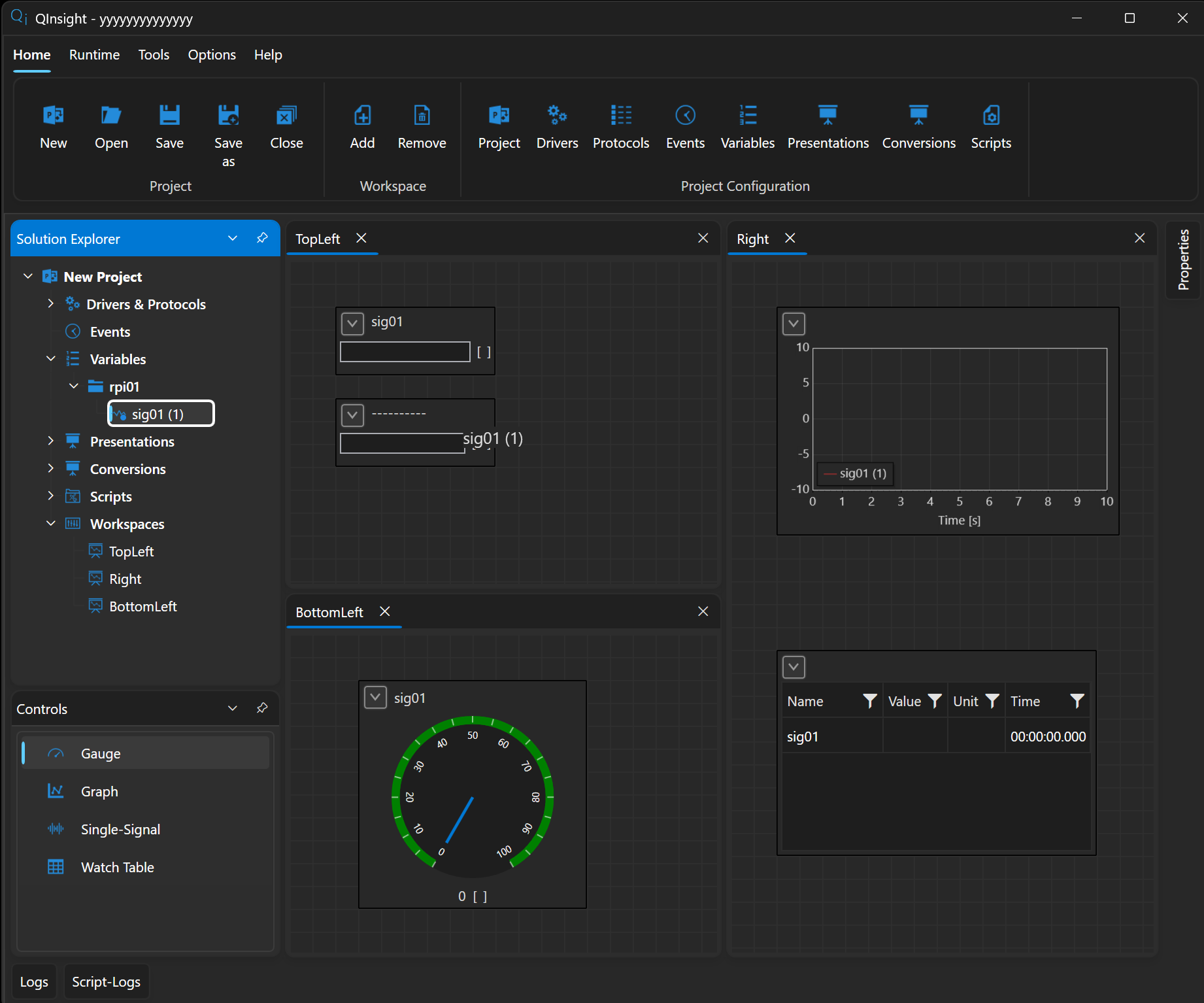
The behavior depends on the control type:
- Gauge and Single-Signal display one variable — dropping another variable replaces the original one.
- Graph and Watch Table display multiple variables — every drop adds another series or row.
Bindings are saved with the project and restored automatically when it is opened.
Which control for what
- Graph — signal time course: multiple data series, multiple vertical axes (autoscale or a fixed range), a configurable time window, a cursor, and a legend. It can export a snapshot (PNG, SVG…) and data to CSV, and clear the chart.
- Gauge — an instantaneous value: a radial or linear (horizontal/vertical) indicator with a Min/Max range and optional thresholds for warning and error zones.
- Single-Signal — a single value with a caption and unit; a dead band suppresses flicker on small changes.
- Watch Table — a table of variables with Name, Value, Unit, and Time columns; column visibility and widths are customizable.
All controls have a configurable refresh period (Refresh time, default 250 ms) so they do not overload the UI with fast data.
Next
Everything is ready — start the communication.