

Complete example: ISS position (driver + protocol)
The previous chapters showed skeletons — here is the smallest genuinely working driver + protocol pair you can write. And although the whole thing fits on a couple of screens, it works with real live data: once a second it asks a public REST API for the current position of the International Space Station and feeds four variables — the latitude, longitude, altitude and velocity of an object flying over your head at roughly 27,600 km/h.
The division of labour is exactly the one every QInsight driver and protocol uses:
- IssDriver does one thing only: every period it downloads one JSON
response with
HttpClientand hands it to its protocols as-is. It knows nothing about the content — from its point of view it is just text. - IssJsonProtocol takes the text, parses it as JSON and distributes
the values to variables. Each variable claims its field with the
path="latitude"commParam, so one response fills all the variables at once.

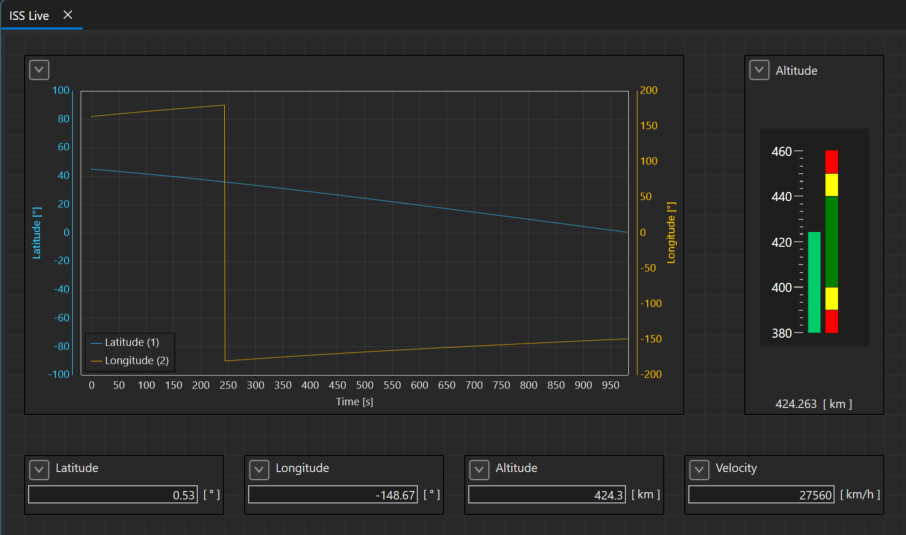
The data has a pleasant property on top: it is not random. The latitude draws a sine wave with the period of one orbit (~92 minutes), the longitude a sawtooth — the station keeps flying "straight" while the Earth rotates underneath, so every orbit starts a bit further west. Let the graph run for a few minutes and the shapes start to show.
Where the data comes from
The example uses the wheretheiss.at API — free, no registration, no key. A single GET request:
https://api.wheretheiss.at/v1/satellites/25544
returns one flat JSON object (25544 is the ISS catalog number):
{
  "name": "iss",
  "latitude": -29.06,
  "longitude": 20.04,
  "altitude": 423.31,
  "velocity": 27575.13,
  "visibility": "daylight",
  ...
}
The operator asks for at most ~1 request per second — which is why the
driver refuses a faster period (see SetConfiguration below). Running
the example naturally requires an internet connection.
Trying the example
- Build both projects (below) and copy the DLLs into the
DriversandProtocolsfolders next to QInsight.exe. - In Project Configuration add the ISS Position (example) driver
—
periodMs=1000is pre-filled — and the ISS JSON Protocol (example) under it. The protocol names the driver inCompatibleDrivers(see below), so under any other driver it is greyed out — and vice versa. - Create four variables of type double and assign them to the protocol
with commParams:
Latitude:path="latitude"Longitude:path="longitude"Altitude:path="altitude"Velocity:path="velocity"
- For sensible graph and gauge ranges, use presentations: latitude −90…90°, longitude −180…180°, altitude 380…460 km, velocity 27,400…27,700 km/h.
- Start the runtime — the values come alive right after the first API response.
Projects
Two ordinary class-library projects; they reference only the QSuite base
projects (Driver, resp. Protocol + VariableEvents). HttpClient
is part of .NET, no NuGet package is needed.
<!-- IssDriver.csproj -->
<Project Sdk="Microsoft.NET.Sdk">
    <PropertyGroup>
        <TargetFramework>net10.0</TargetFramework>
        <ImplicitUsings>enable</ImplicitUsings>
        <Nullable>enable</Nullable>
        <AssemblyName>Qenex.QSuite.Examples.IssDriver</AssemblyName>
        <RootNamespace>Qenex.QSuite.Examples.IssDriver</RootNamespace>
    </PropertyGroup>
    <ItemGroup>
      <ProjectReference Include="..\..\Drivers\Driver\Driver.csproj" />
    </ItemGroup>
</Project>
<!-- IssJsonProtocol.csproj -->
<Project Sdk="Microsoft.NET.Sdk">
    <PropertyGroup>
        <TargetFramework>net10.0</TargetFramework>
        <ImplicitUsings>enable</ImplicitUsings>
        <Nullable>enable</Nullable>
        <AssemblyName>Qenex.QSuite.Examples.IssJsonProtocol</AssemblyName>
        <RootNamespace>Qenex.QSuite.Examples.IssJsonProtocol</RootNamespace>
    </PropertyGroup>
    <ItemGroup>
      <ProjectReference Include="..\..\Protocols\Protocol\Protocol.csproj" />
      <ProjectReference Include="..\..\Variables\VariableEvents\VariableEvents.csproj" />
    </ItemGroup>
</Project>
Driver: IssDriver.cs
The whole driver life cycle in one place: DefaultRawSettings as the
settings template, the state machine in StartAsync/StopAsync and one
loop calling the API every period. Three spots worth noticing:
SetConfigurationenforces a minimum period of 1000 ms — this is a free public service and politeness is part of the design, not a footnote.- A network error does not kill the loop. A dropped connection or
a slow response is just logged as a warning and the loop carries on —
for a device connected over the internet this is a normal operating
state, not a reason to go
Faulted. Send/SendAsyncare empty. The API is read-only, so the driver has nothing to transmit. The full write path is shown in the temperature sensor example.
using System.Reflection;
using Qenex.QSuite.Common.CoreComm;
using Qenex.QSuite.Drivers.Driver;
using Qenex.QSuite.LogSystems.LogSystem;
using Qenex.QSuite.Protocols.Protocol;
using Qenex.QSuite.Specifications.Specification;

namespace Qenex.QSuite.Examples.IssDriver;

/// <summary>
/// Example driver: reads live data from a public REST API — the current position of the
/// International Space Station. Every period it performs one HTTP GET and hands the raw JSON
/// response to its protocols; turning the JSON into variable values is the protocol's job
/// (see the IssJsonProtocol example).
/// This is about the smallest possible real-data driver: read-only, one fixed URL, one setting.
/// </summary>
public class IssDriver : DriverBase, ITransportSource<string>
{
    // Free, key-less API returning one flat JSON object with the current ISS position.
    // Be polite to the public service: do not poll faster than ~1 request per second.
    private const string Url = "https://api.wheretheiss.at/v1/satellites/25544";

    private int periodMs = 1000;

    private HttpClient? httpClient;
    private CancellationTokenSource? runCts;
    private Task? runTask;

    public IssDriver()
    {
        Specification = new SpecificationBase
        {
            Name = "IssDriver",
            Label = "ISS Position (example)",
            Description = "Example driver polling the ISS position from a public REST API.",
            CreatedOn = new DateTime(2026, 7, 27),
            Version = Assembly.GetExecutingAssembly().GetName().Version ?? new Version(1, 0, 0, 0),
            Author = "Qenex",
            Company = "QENEX Ltd."
        };
    }

    // Shown pre-filled when the driver is added in Project Configuration.
    public override string DefaultRawSettings => "periodMs=1000";

    public override void SetConfiguration()
    {
        // "key=value;..." — a missing or invalid key silently keeps the default.
        foreach (var part in RawSettings.Split(';', StringSplitOptions.RemoveEmptyEntries | StringSplitOptions.TrimEntries))
        {
            var pair = part.Split('=', 2, StringSplitOptions.TrimEntries);
            if (pair.Length == 2
                && pair[0].Equals("periodMs", StringComparison.OrdinalIgnoreCase)
                && int.TryParse(pair[1], out var parsedPeriod))
            {
                // The API asks for at most ~1 request per second, so slower is allowed, faster is not.
                periodMs = Math.Max(parsedPeriod, 1000);
            }
        }
    }

    public override async Task StartAsync(CancellationToken ct = default)
    {
        if (!IsEnabled)
        {
            SetState(CommunicationState.Disabled);
            return;
        }

        if (State == CommunicationState.Running || runTask is { IsCompleted: false })
        {
            return;
        }

        SetState(CommunicationState.Starting);

        // Short timeout so a slow or unreachable server cannot block the loop for long.
        httpClient = new HttpClient { Timeout = TimeSpan.FromSeconds(5) };

        foreach (var protocol in Protocols)
        {
            await protocol.StartAsync(ct);
        }

        runCts = CancellationTokenSource.CreateLinkedTokenSource(ct);
        runTask = RunLoopAsync(runCts.Token);
        SetState(CommunicationState.Running);
    }

    public override async Task StopAsync(CancellationToken ct = default)
    {
        SetState(CommunicationState.Stopping);

        if (runCts != null)
        {
            await runCts.CancelAsync();
        }

        if (runTask != null)
        {
            try
            {
                await runTask.WaitAsync(TimeSpan.FromSeconds(5), ct);
            }
            catch (OperationCanceledException)
            {
            }
            catch (TimeoutException)
            {
                Logger?.Log(LogLevel.Warn, "ISS position: the polling loop did not stop before timeout.");
            }
        }

        foreach (var protocol in Protocols)
        {
            await protocol.StopAsync(ct);
        }

        httpClient?.Dispose();
        httpClient = null;
        runCts?.Dispose();
        runCts = null;
        runTask = null;
        SetState(CommunicationState.Stopped);
    }

    public override void Dispose()
    {
        httpClient?.Dispose();
        runCts?.Dispose();
    }

    // The API is read-only, so there is nothing to send. A writable driver would push the
    // encoded data to the device here (see the TempSensorDriver example).
    public override void Send<T>(T data)
    {
    }

    public override Task SendAsync<T>(T data, CancellationToken ct = default)
    {
        return Task.CompletedTask;
    }

    private async Task RunLoopAsync(CancellationToken ct)
    {
        try
        {
            while (!ct.IsCancellationRequested)
            {
                try
                {
                    // One GET returns one JSON object carrying several signals at once
                    // (latitude, longitude, altitude, velocity, ...).
                    var json = await httpClient!.GetStringAsync(Url, ct);

                    foreach (var protocol in Protocols)
                    {
                        if (protocol is ProtocolBase<string> textProtocol)
                        {
                            await textProtocol.AddReceivedDataToQueueAsync([json], ct);
                        }
                    }
                }
                catch (Exception e) when (e is HttpRequestException or TaskCanceledException && !ct.IsCancellationRequested)
                {
                    // Network hiccups are normal with a public API: log it and try again next period.
                    Logger?.Log(LogLevel.Warn, $"ISS position: request failed ({e.Message}).");
                }

                await Task.Delay(periodMs, ct);
            }
        }
        catch (OperationCanceledException) when (ct.IsCancellationRequested)
        {
            // Normal stop.
        }
        catch (Exception e)
        {
            Logger?.Log(LogLevel.Error, $"ISS position loop failed: {e.Message}");
            SetState(CommunicationState.Faulted, e.Message);
        }
    }
}
Protocol: IssJsonProtocol.cs
The protocol is even shorter than the driver, mostly thanks to one
decision: it has no queue and no worker thread of its own. The data
arrives once a second, so it is decoded straight in
AddReceivedDataToQueueAsync — on the driver's polling task.
StartAsync/StopAsync then only flip the state. On fast buses this
would be a bad idea (a driver must never wait for processing); the
temperature sensor example
shows a proper queue with its own consumer.
The decoding in Decode is straightforward: parse the document and give
a value to every variable whose path points to a numeric field.
Encode returns nothing — a REST API you can only read from leaves
nothing to encode.
using System.Reflection;
using System.Text.Json;
using Qenex.QSuite.Common.CoreComm;
using Qenex.QSuite.LogSystems.LogSystem;
using Qenex.QSuite.Protocols.Protocol;
using Qenex.QSuite.Specifications.Specification;
using Qenex.QSuite.Variables.QVariables;
using Qenex.QSuite.Variables.QVariables.Values;
using Qenex.QSuite.Variables.VariableEvents;

namespace Qenex.QSuite.Examples.IssJsonProtocol;

/// <summary>
/// Example protocol: picks numeric fields out of the received ISS position JSON by name. Each
/// variable states which field it wants via the "path" commParam (path="latitude"), so one JSON
/// document can feed many variables at once. Nothing here is ISS-specific except the name — the
/// same code would decode any flat JSON object — but as an example it is paired with the IssDriver.
/// </summary>
public class IssJsonProtocol : ProtocolBase<string>
{
    public IssJsonProtocol()
    {
        Specification = new SpecificationBase
        {
            Name = "IssJsonProtocol",
            Label = "ISS JSON Protocol (example)",
            Description = "Example protocol decoding numeric fields of the ISS position JSON into variables.",
            CreatedOn = new DateTime(2026, 7, 27),
            Version = Assembly.GetExecutingAssembly().GetName().Version ?? new Version(1, 0, 0, 0),
            Author = "Qenex",
            Company = "QENEX Ltd."
        };
    }

    // The transport type (string) alone cannot tell text-line drivers apart, and this
    // protocol only understands the ISS position JSON, so it narrows itself to its driver.
    public override IReadOnlyList<string> CompatibleDrivers => ["IssDriver"];

    // The protocol has no protocol-level settings; everything is per-variable commParams.
    public override void SetConfiguration()
    {
    }

    public override string CreateDefaultCommParam(IVariableBase variable, IEnumerable<IVarEvent> variableEvents)
    {
        return "path=\"latitude\"";
    }

    public override IProtocolVariable? CreateProtocolVariable(IVariableBase variable, string commParams, bool isCommunicated)
    {
        try
        {
            return new ProtocolVariable
            {
                Variable = variable,
                IsCommunicated = isCommunicated,
                ProtocolVariableSpecification = IssJsonVariableSpecification.Create(commParams)
            };
        }
        catch (Exception e)
        {
            Logger?.Log(LogLevel.Warn, $"Protocol variable specification for variable {variable.Name} could not be created ({e.Message}).");
            return null;
        }
    }

    public override IProtocolVariable? CreateProtocolVariable(IVariableBase variable, IVarEvent variableEvent, string id)
    {
        return CreateProtocolVariable(variable, $"path=\"{id}\"", true);
    }

    public override IProtocolVariable? CreateProtocolVariable(IVariableBase variable, IEnumerable<IVarEvent> variableEvents,
        string commParams, bool isCommunicated)
    {
        // The data arrive whenever the driver polls them, so variable events are not used.
        return CreateProtocolVariable(variable, commParams, isCommunicated);
    }

    // No worker loop is needed: received documents are decoded directly in
    // AddReceivedDataToQueueAsync, so start/stop only maintain the state machine.
    // (For a queued, cancelable consumer loop see the TempSensorProtocol example.)
    public override Task StartAsync(CancellationToken ct = default)
    {
        SetState(IsEnabled ? CommunicationState.Running : CommunicationState.Disabled);
        return Task.CompletedTask;
    }

    public override Task StopAsync(CancellationToken ct = default)
    {
        SetState(CommunicationState.Stopped);
        return Task.CompletedTask;
    }

    public override void Dispose()
    {
    }

    // At ~1 document per second there is no need for an internal queue — the data are
    // decoded right away on the driver's polling task.
    public override async Task AddReceivedDataToQueueAsync(IEnumerable<string> data, CancellationToken ct = default)
    {
        if (State != CommunicationState.Running)
        {
            return;
        }

        await ProcessReceivedDataAsync(data, ct);
    }

    protected override void ProcessReceivedData(IEnumerable<string> data)
    {
        foreach (var protocolVariable in Decode(data))
        {
            protocolVariable.NotifyValueChanged();
        }
    }

    protected override async Task ProcessReceivedDataAsync(IEnumerable<string> data, CancellationToken ct = default)
    {
        var notifyTasks = Decode(data).Select(protocolVariable => protocolVariable.NotifyValueChangedAsync());
        await Task.WhenAll(notifyTasks);
    }

    protected override IEnumerable<IProtocolVariable> Decode(IEnumerable<string> data)
    {
        var updated = new List<IProtocolVariable>();

        foreach (var json in data)
        {
            JsonDocument document;
            try
            {
                document = JsonDocument.Parse(json);
            }
            catch (JsonException e)
            {
                Logger?.Log(LogLevel.Warn, $"ISS JSON protocol: cannot parse received data ({e.Message}).");
                continue;
            }

            using (document)
            {
                // Every variable whose "path" names a numeric field of this document gets its value.
                foreach (var protocolVariable in Variables)
                {
                    if (!protocolVariable.IsCommunicated
                        || protocolVariable.ProtocolVariableSpecification is not IssJsonVariableSpecification spec
                        || protocolVariable.Variable is not ScalarVariable scalarVariable
                        || !document.RootElement.TryGetProperty(spec.Path, out var field)
                        || field.ValueKind != JsonValueKind.Number)
                    {
                        continue;
                    }

                    if (!TrySetValue(scalarVariable, field.GetDouble()))
                    {
                        Logger?.Log(LogLevel.Warn, $"ISS JSON protocol: variable '{scalarVariable.Name}' has an unsupported value type.");
                        continue;
                    }

                    scalarVariable.Timestamp = DateTime.UtcNow;
                    updated.Add(protocolVariable);
                }
            }
        }

        return updated;
    }

    // The protocol is read-only (a REST API you can only GET), so nothing is ever encoded.
    // For the write direction see the TempSensorProtocol example.
    protected override IEnumerable<string> Encode(IEnumerable<IProtocolVariable> protocolVariables)
    {
        yield break;
    }

    // Values<T>.SetValue does not convert, so the received double is converted to the
    // variable's type here; the example supports the common numeric types.
    private static bool TrySetValue(ScalarVariable scalarVariable, double value)
    {
        switch (scalarVariable.Values)
        {
            case Values<double> doubleValues:
                doubleValues.Value = value;
                return true;
            case Values<float> floatValues:
                floatValues.Value = (float)value;
                return true;
            case Values<int> intValues:
                intValues.Value = (int)Math.Round(value);
                return true;
            default:
                return false;
        }
    }
}
Variable specification: IssJsonVariableSpecification.cs
The addressing is a single item: the JSON field name. The Path property
matches the commParam key 1:1, so the inherited ToCommParam()
serialization works without an override — the same trick as in the
temperature sensor example.
using Qenex.QSuite.Protocols.Protocol;

namespace Qenex.QSuite.Examples.IssJsonProtocol;

/// <summary>
/// Addressing of one variable: the name of the JSON field whose value the variable receives.
/// The property matches the commParam key 1:1 ("path"), so the inherited reflection-based
/// ToCommParam() round-trips the specification without an override.
/// </summary>
public class IssJsonVariableSpecification : ProtVariableSpecification
{
    public IssJsonVariableSpecification()
    {
        Name = "IssJsonVariableSpecification";
    }

    /// <summary>Name of the field in the received JSON object, e.g. "latitude". Case-sensitive.</summary>
    public string Path { get; set; } = string.Empty;

    public static IssJsonVariableSpecification Create(string commParams)
    {
        var parameters = commParams
            .Split(';', StringSplitOptions.RemoveEmptyEntries | StringSplitOptions.TrimEntries)
            .Select(parameter => parameter.Split('=', 2))
            .Where(parts => parts.Length == 2)
            .ToDictionary(parts => parts[0].Trim(), parts => parts[1].Trim().Trim('"'), StringComparer.OrdinalIgnoreCase);

        if (!parameters.TryGetValue("path", out var path) || string.IsNullOrWhiteSpace(path))
        {
            throw new ArgumentException("Missing mandatory commParam 'path'.");
        }

        return new IssJsonVariableSpecification { Path = path };
    }
}
How the members relate
| Step | Who | Members |
|---|---|---|
| Adding the driver/protocol in the UI | plugin | DefaultRawSettings, CreateDefaultCommParam |
| Assigning a variable | protocol | CreateProtocolVariable → the spec's Create |
| Runtime start | driver | StartAsync → start of protocols → the polling loop |
| Reading data | driver → protocol | HTTP GET → AddReceivedDataToQueueAsync → Decode → NotifyValueChangedAsync |
| Stop | driver | StopAsync (cancel the loop, stop protocols, dispose HttpClient) |
What the example deliberately leaves out
To stay as short as possible, three things are intentionally missing — and all three are shown in the temperature sensor example:
- the write path (an operator writes a value → the protocol encodes it → the driver transmits it),
- a received-data queue with its own consumer — a necessity wherever data arrives faster than it is processed,
- a communication direction in commParams (
direction="read/write") — everything here is read-only, so the parameter is not needed.
One side note: apart from the name, there is nothing ISS-specific in the
protocol. The same code would decode any flat JSON object — just change
the URL in the driver and the path values.
Next
Example temp sensor — the full pattern including writes and the queue. The individual skeletons: Custom driver and Custom protocol.