

What is QENEX Suite
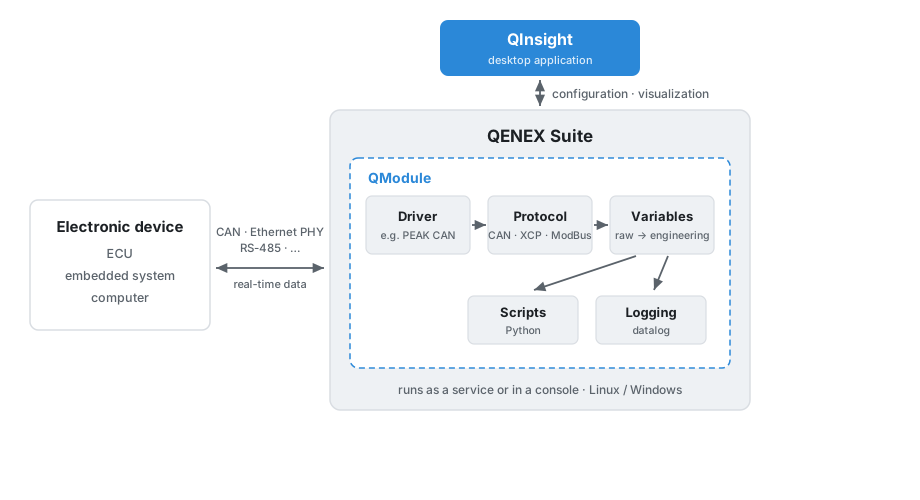
QENEX Suite is a modular software platform for real-time communication with electronic devices. Typically these are electronic control units (ECU), embedded systems built on microcontrollers or processors, computers, and other electronic devices that communicate over interfaces such as CAN, Ethernet PHY, RS-485, and others. QENEX Suite connects to the device through a communication driver and protocol, exchanges data with it in real time, and makes that data available for further processing.
Core building blocks
The core of a QENEX Suite project is the QModule, which holds the complete configuration of communication with an electronic device (or several devices) through a communication driver and protocol. Individual variables (signals, data, etc.) are exchanged through the protocol. Variables can be logged automatically or processed with Python scripts. Python scripts can be used for a wide range of automated services.
The parts of a QModule:
- Drivers — libraries that handle the connection to the hardware, for example a PEAK CAN interface.
- Protocols — the rules for talking to a device over a driver, for example basic CAN frames, XCP, or ModBus.
- Variables — the values exchanged with the device in real time. Each variable has a raw value (the actual transmitted value) and an engineering value (the physical quantity after a conversion is applied), together with a presentation that defines how it is displayed.
- Scripts — user Python programs that react to incoming data: on start, on stop, periodically, or whenever a variable changes.
How a project is configured
All of these settings — drivers, protocols, variables, and scripts — are stored together in a configuration file. When the platform starts, it loads this file and sets up the project accordingly. In QInsight you build and edit this configuration visually, without touching the file by hand.
Where it runs
QENEX Suite can run as a background service or in a console, on Linux and Windows. The same project can therefore run unattended on a target machine, or interactively while you develop and debug it.
Next
Continue with What is QInsight to meet the desktop application you will use throughout this tutorial.