

Raw CAN frames from a Raspberry Pi
What this is about
The example shows the Raw CAN Frames protocol: values in fixed bytes of a CAN frame without any higher layer, the way simple electronics send them and the way a bus looks when you monitor it.
The counterpart is the Python script Qenex_RawCan_RandomWalkGenerator.py
from the Examples folder next to QInsight.exe. It runs on Linux with
SocketCAN, typically on a Raspberry Pi with a CAN HAT, and:
- sends five random walks
rnd1tornd5on identifiers0x100to0x104, 50 sets per second; every frame has 8 bytes: a float32 value in bytes 0–3 and the float32 generator time in bytes 4–7, - accepts frames
0x180to0x184(new offset of walk 1 to 5) and0x190to0x194(new step), float32 in bytes 0–3. That is exactly the frame QInsight sends when a variable with directionwriteis written.
QInsight is on the bus through a PEAK PCAN-USB adapter at 250 kbit/s.
Raspberry + CAN HAT  ── 0x100: [float value][float t] ──►  PCAN-USB  ──►  QInsight (graph, watch table)
                     ◄── 0x180: [float offset]        ──                   write from the watch table
The project Qenex_CAN_RawCAN_PythonRandomWalks.qproj is in the Examples folder.
What the example shows
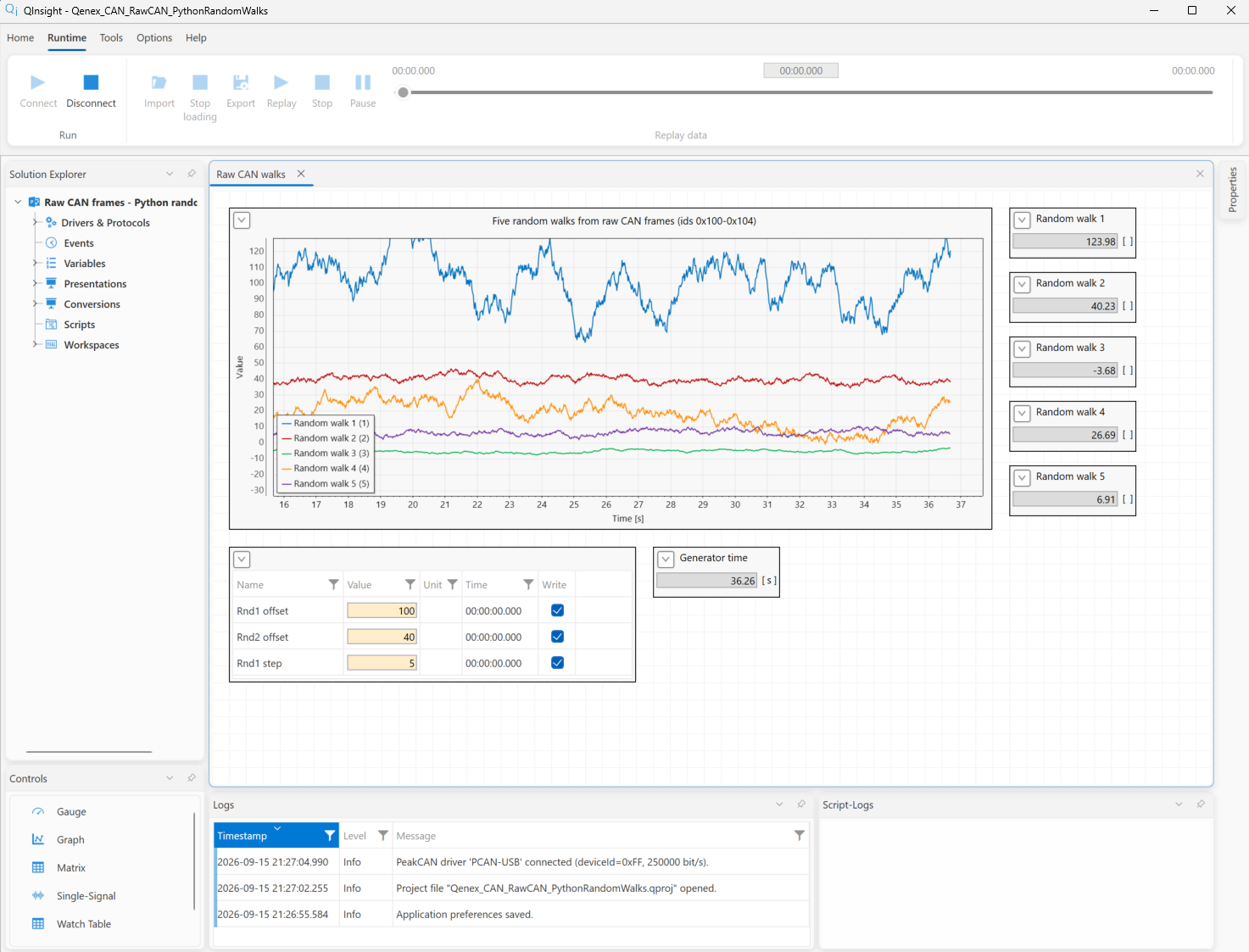
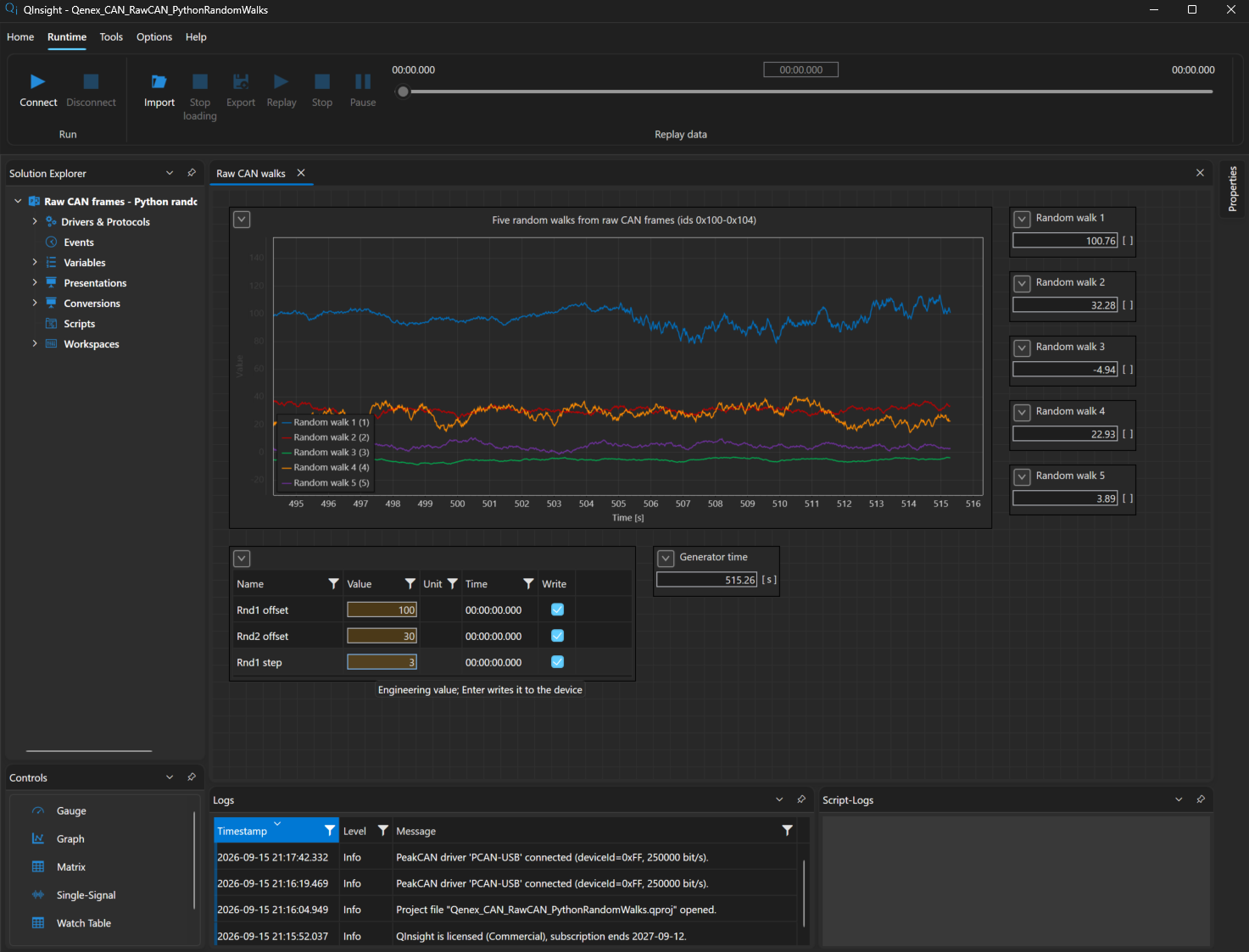
- Reading five walks from the bus on a graph and in signal controls.
- Two variables from one frame:
Rnd1reads bytes 0–3 of frame0x100,Rnd1Timebytes 4–7 of the same frame (offset="4"). - Writing to the bus:
Rnd1Offset(0x180),Rnd2Offset(0x181) andRnd1Step(0x190) have directionwrite; a write from the watch table sends a frame and the walk jumps to the new offset. - Adapter timestamps: samples carry the receive time of the PCAN-USB, not the moment of processing on the PC.
What you need
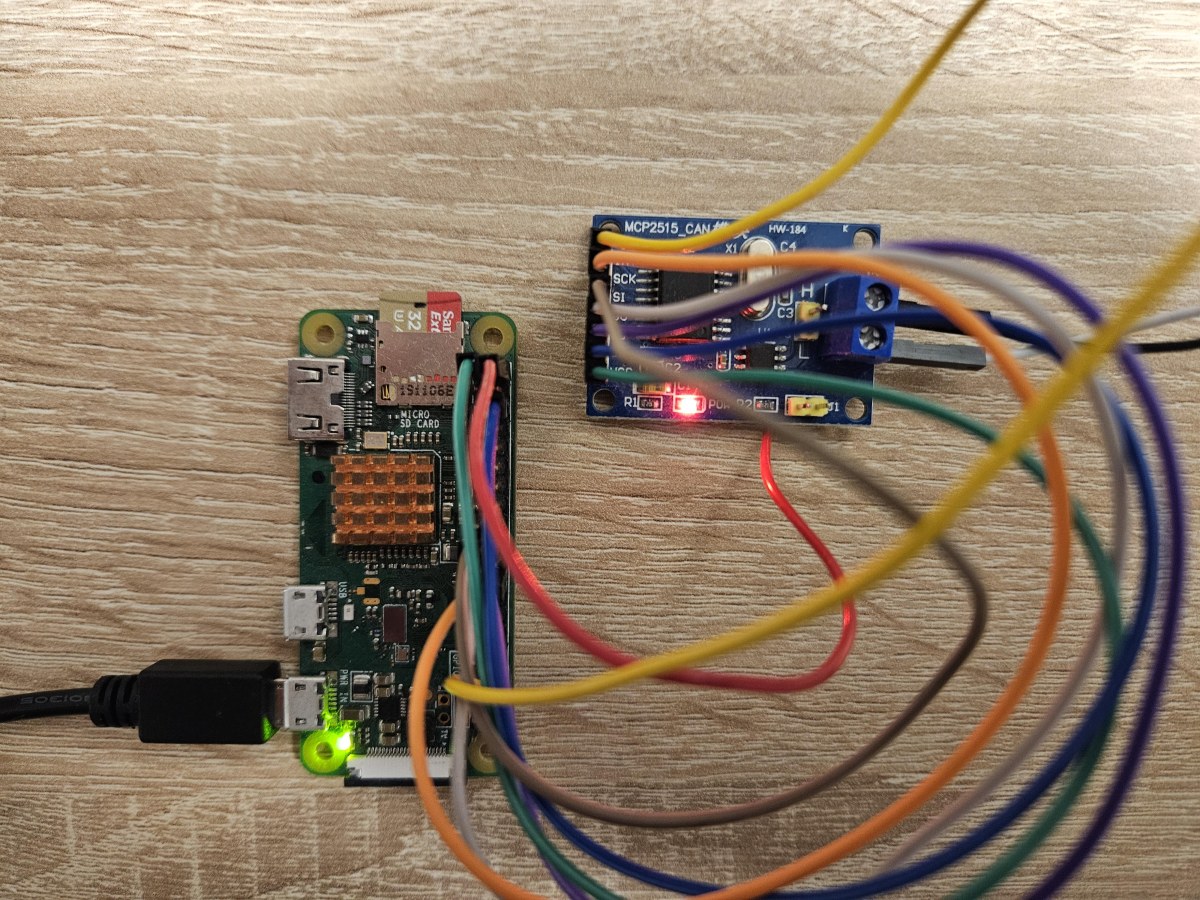
Very inexpensive hardware is enough on the generator side. The photo shows the setup the example was verified on: a Raspberry Pi Zero and a module with the MCP2515 CAN controller and a TJA1050 bus transceiver, wired to the Raspberry Pi over SPI with a few jumper wires. The module costs a few euros and behaves like an ordinary SocketCAN interface in Linux.
The MCP2515 module is enabled in Raspberry Pi OS in /boot/firmware/config.txt
(/boot/config.txt on older systems):
dtparam=spi=on
dtoverlay=mcp2515-can0,oscillator=8000000,interrupt=25
oscillator matches the crystal on the module (usually 8 MHz, 16 MHz on some
modules) and interrupt is the GPIO number the module's INT output is wired
to. After a reboot the can0 interface is available. Any other CAN board for
the Raspberry Pi, or any Linux computer with a SocketCAN interface, works
just as well.
- A Raspberry Pi with a SocketCAN
can0interface and Python 3; bring the interface up at 250 kbit/s:sudo ip link set can0 up type can bitrate 250000 python3 Qenex_RawCan_RandomWalkGenerator.py - A PEAK PCAN-USB on the QInsight PC, bus terminated with 120 Ω. In the
driver settings set
deviceIdto the id of your adapter (hexadecimal, see PEAK CAN);bitratestays250000.
The project
Driver and protocol
| PCAN-USB driver | Meaning |
|---|---|
deviceId=0xff | adapter id from the PEAK settings — adjust |
bitrate=250000 | bus speed, the same as on the Raspberry Pi |
reconnectDelayMs=1000, reconnectAttempts=-1 | after the adapter is unplugged it retries forever |
The protocol has no settings.
Variables
| Variable | Type | Comm params | Meaning |
|---|---|---|---|
Rnd1 … Rnd5 | float | direction="read";canId="0x100"…"0x104";offset="0";byteOrder="le" | the walks |
Rnd1Time | float | direction="read";canId="0x100";offset="4" | generator time from the second half of the frame |
Params/Rnd1Offset | float | direction="write";canId="0x180" | new offset of walk 1 |
Params/Rnd2Offset | float | direction="write";canId="0x181" | new offset of walk 2 |
Params/Rnd1Step | float | direction="write";canId="0x190" | step of walk 1 |
Workspace
A graph of all five walks, a watch table with the three writable parameters, a signal control of the generator time and five signal controls of the values.
What you will see and what to try
- After Start five walks run around their offsets 0, 10, −5, 20 and 5.
Rnd1Timegrows from the start of the generator. - Write
Rnd1Offset= 15: walk 1 jumps to 15 and wanders around it; the generator printsrnd1.O = 15.000.Rnd1Step= 5 makes it wild, 0.1 calms it down. - Unplug the PCAN-USB: the driver reports the adapter loss and retries every second; after plugging it in the data flow again and the timestamps are realigned.
- Type
canId="zz"into a variable's Comm params and Apply: the variable is reported in the log as not communicated with the reason, instead of staying silent.
The generator script
The whole Qenex_RawCan_RandomWalkGenerator.py; the frame layout is in
the docstring. For your own device take the frame construction
(struct.pack("<ff", value, t)) and the reading of the control frames.
#!/usr/bin/env python3
"""Random-walk CAN generator - the counterpart of QInsight's Raw CAN Frames protocol.
Runs on a Linux machine with a SocketCAN interface, typically a Raspberry Pi with a CAN HAT
(QInsight sits on the other end of the bus with a PEAK PCAN-USB adapter):
sudo ip link set can0 up type can bitrate 250000
python3 Qenex_RawCan_RandomWalkGenerator.py # can0, 50 sets of frames per second
python3 Qenex_RawCan_RandomWalkGenerator.py --channel can1 --hz 20
Shipped with QInsight in the Examples folder; used by the example
Qenex_CAN_RawCAN_PythonRandomWalks.qproj.
Frames sent (standard 11-bit ids, DLC 8, little-endian):
id 0x100 .. 0x104 rnd1 .. rnd5 bytes 0-3 float32 value, bytes 4-7 float32 time t [s]
Each signal is a random walk: every sample moves by a random step in +-step and a weak
mean reversion pulls it back towards its offset O, so it never drifts off the chart.
Frames accepted (what QInsight sends for a Raw CAN variable with direction="write"):
id 0x180 .. 0x184 bytes 0-3 float32 new offset O of rnd1 .. rnd5
id 0x190 .. 0x194 bytes 0-3 float32 new step size of rnd1 .. rnd5
The walk jumps to the new offset at once, so a write is visible immediately on the graph.
"""
import argparse
import random
import socket
import struct
import threading
import time
# id -> random-walk parameters
# O = offset (the value the walk hovers around)
# step = max size of one random step; each sample moves by +-step
# reversion = mean-reversion strength (0..1); pulls the value back towards O
SIGNALS = {
0x100: {"O": 0.0, "step": 0.5, "reversion": 0.01},
0x101: {"O": 10.0, "step": 1.0, "reversion": 0.02},
0x102: {"O": -5.0, "step": 0.3, "reversion": 0.015},
0x103: {"O": 20.0, "step": 2.0, "reversion": 0.01},
0x104: {"O": 5.0, "step": 0.8, "reversion": 0.03},
}
OFFSET_ID_BASE = 0x180 # 0x180 + n sets O of the n-th signal
STEP_ID_BASE = 0x190 # 0x190 + n sets step of the n-th signal
FRAME_FORMAT = "=IB3x8s" # SocketCAN frame: id (4), dlc (1), padding (3), data (8)
CAN_EFF_FLAG = 0x80000000
lock = threading.Lock()
STATE = {cid: p["O"] for cid, p in SIGNALS.items()} # current value of every walk
def step_walk(can_id):
"""Advance one random walk by one step and return the new value."""
with lock:
p = SIGNALS[can_id]
x = STATE[can_id]
x = x + random.uniform(-p["step"], p["step"]) + p["reversion"] * (p["O"] - x)
STATE[can_id] = x
return x
def build_frame(can_id, value, t):
data = struct.pack("<ff", value, t) # 8 B: float32 value + float32 t
return struct.pack(FRAME_FORMAT, can_id, len(data), data)
def apply_frame(raw):
"""A received frame: 0x18n / 0x19n with a float32 sets offset / step of signal n."""
can_id, dlc, data = struct.unpack(FRAME_FORMAT, raw)
if can_id & CAN_EFF_FLAG or dlc < 4:
return
can_id &= 0x7FF
for base, key in ((OFFSET_ID_BASE, "O"), (STEP_ID_BASE, "step")):
n = can_id - base
if 0 <= n < len(SIGNALS):
signal_id = 0x100 + n
value = struct.unpack("<f", data[:4])[0]
with lock:
SIGNALS[signal_id][key] = value
if key == "O":
STATE[signal_id] = value # jump there, so the write shows at once
print(f"rnd{n + 1}.{key} = {value:.3f}", flush=True)
return
def reader_thread(sock, stop):
while not stop.is_set():
try:
raw = sock.recv(16)
except OSError:
break
if len(raw) == 16:
apply_frame(raw)
def main():
parser = argparse.ArgumentParser(description="Raw CAN random-walk generator for QInsight (SocketCAN).")
parser.add_argument("--channel", default="can0", help="SocketCAN interface (default can0)")
parser.add_argument("--hz", type=float, default=50.0, help="sets of 5 frames per second (default 50)")
args = parser.parse_args()
sock = socket.socket(socket.AF_CAN, socket.SOCK_RAW, socket.CAN_RAW)
sock.bind((args.channel,))
stop = threading.Event()
threading.Thread(target=reader_thread, args=(sock, stop), daemon=True).start()
t0 = time.monotonic()
period = 1.0 / args.hz
next_t = time.monotonic()
print(f"Raw CAN generator on {args.channel}: ids 0x100-0x104 @ {args.hz:g} Hz, "
f"writes on 0x180-0x184 (offset) and 0x190-0x194 (step). Ctrl+C to stop.", flush=True)
try:
while True:
t = time.monotonic() - t0
for can_id in SIGNALS: # 5 frames, one signal each
sock.send(build_frame(can_id, step_walk(can_id), t))
next_t += period
time.sleep(max(0.0, next_t - time.monotonic()))
except KeyboardInterrupt:
pass
finally:
stop.set()
sock.close()
if __name__ == "__main__":
main()
Related chapters
- Raw CAN Frames in the protocol reference
- PEAK CAN in the driver reference
- XCP on CAN on a NUCLEO-H723ZG — the same adapter with the XCP protocol